Blog · AI Agents ·
Claude Code for free with Ollama on Windows: no GPU, and how slow it really is
By Khadim Hussain · 9 min read
In short
Yes, Claude Code runs for free on Windows with Ollama: install Ollama, pull a model that supports tools (I used qwen3.5:4b), set a 64K context, then run ollama launch claude --model qwen3.5:4b. With no graphics card it's slow. On a 16-core laptop it fixed a one-line bug in about 6 minutes; on a 2-core machine it never finished. Switch to manual mode first: in auto mode the local model has to approve every command, it timed out, and Claude Code ran nothing and guessed a wrong result.
Contents
- Can you use Claude Code for free?
- What you need
- How to set up Claude Code with Ollama on Windows
- How fast is Ollama without a graphics card?
- Can a local model fix a real bug?
- Why auto mode blocks every command on a local model
- The fix in manual mode: about 6 minutes
- Settings that help on a slow PC
- Is Claude Code with Ollama worth it?
- Frequently asked questions
Claude Code works for free on Windows if you point it at a local model through Ollama, and I wanted to know how well that holds up on an ordinary PC with no graphics card. So I filmed the whole thing for my YouTube channel, Khadim Labs: the install, a speed test on two machines, and Claude Code fixing a real bug with a 4-billion-parameter model. It worked, but slowly, and one default setting made the first attempt fail in a way that's easy to miss. Versions: Ollama 0.40.15, Claude Code 2.1.319, tested 9 November 2026.
Can you use Claude Code for free?
Yes. Claude Code is just the agent: it reads your files, edits them and runs commands, and it needs a model behind it to decide what to do. Normally that model is Claude on Anthropic's servers, which needs a paid plan or an API key. Ollama runs an open model on your own computer and speaks the same language as Anthropic's API, so Claude Code talks to it instead. Ollama's docs put it this way: "Ollama connects Claude Code to local and cloud models through its Anthropic-compatible API."
What you give up is speed and quality. A 4B model on a laptop processor is far slower than Claude, and it makes more mistakes.
What you need
- Windows 10 22H2 or newer, Home or Pro (Ollama's Windows page).
- Disk space: Ollama's installer was 1.7 GB in the version I filmed (0.40.15; 0.40.16 is 1.9 GB), plus the model.
- Memory: qwen3.5:4b used 5.7 GB at a 64K context in my test. On an 8 GB machine that left 0.33 GB free, so plan on 16 GB.
- A model that supports tools. Claude Code can't work without them.
| Model | Download | Tools | Use it for |
|---|---|---|---|
| gemma3:1b | 806 MB | No | A quick chat test; it can't drive Claude Code |
| qwen3.5:4b | 3.3 GB | Yes | Claude Code on a PC with no GPU |
You don't need admin rights. Ollama says its installer "installs in your account without requiring Administrator rights."
How to set up Claude Code with Ollama on Windows
-
Download
OllamaSetup.exefrom ollama.com/download/windows and run it, or paste Ollama's one-liner into PowerShell:irm https://ollama.com/install.ps1 | iex -
Pull a model that can use tools:
ollama pull qwen3.5:4b -
Give Ollama a bigger context. Its docs say coding tools "should be set to at least 64000 tokens", and with less than 24 GB of graphics memory the default is only 4K. Set it for your account, then quit Ollama from the tray icon and start it again:
[Environment]::SetEnvironmentVariable("OLLAMA_CONTEXT_LENGTH", "65536", "User")You can also use the Context length slider in the Ollama app's settings. Check it worked with
ollama psonce a model is loaded: the CONTEXT column should say 65536. -
Start Claude Code on the local model:
ollama launch claude --model qwen3.5:4bThis sets Claude Code's model and connection variables for that session only. If Claude Code isn't installed, Ollama offers to install it. Without
--modelyou get a picker, and its cloud entries ask you to sign in to Ollama. -
Switch to manual mode before you ask for anything. The next sections show why. Press
Shift+Tabuntil the status bar saysmanual mode on, or start in manual mode by passing the flag through to Claude Code:ollama launch claude --model qwen3.5:4b -- --permission-mode defaultBoth ways are in the docs of Anthropic and Ollama; I didn't film them. In the video I used the settings file shown further down.
How fast is Ollama without a graphics card?
I asked each model the same question, "In two sentences, why should a small business back up its files?", with ollama run <model> --verbose, which prints the speed after the answer. Once on a Windows 11 virtual machine with 2 processor cores, once on my laptop's Intel Core Ultra 9 285H with 16 cores. No GPU in either: on the laptop, Ollama skipped the built-in Intel graphics by itself, and ollama ps showed 100% CPU for both models.
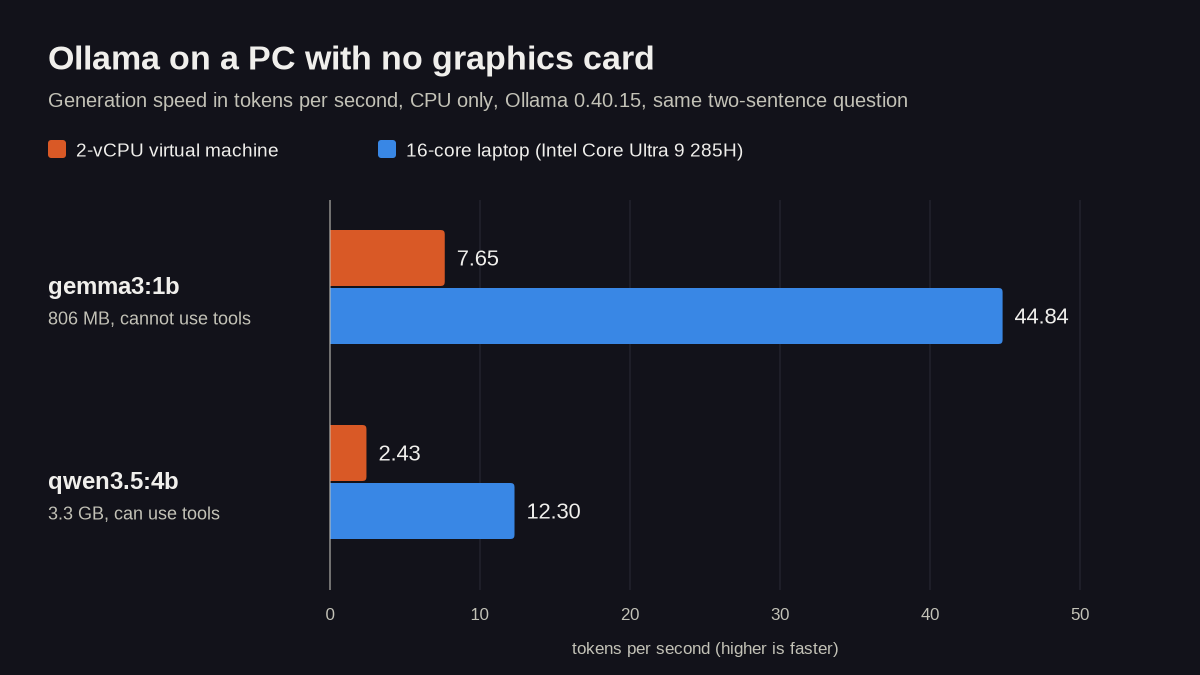
| 2-core VM | 16-core laptop | |
|---|---|---|
| gemma3:1b, tokens per second | 7.65 | 44.84 |
| qwen3.5:4b, tokens per second | 2.43 | 12.30 |
| qwen3.5:4b, time for the two-sentence answer | 6 min 54 s | 1 min 14 s |
Why does qwen3.5 take over a minute for two sentences? It thinks first. On the laptop it wrote 897 tokens for an answer of about 40 words. That habit matters a lot once Claude Code is involved, because every step of a task is another round of thinking.
Can a local model fix a real bug?
My test was a small Python script that adds up an invoice. It takes a 10% discount off twice, so it prints Total: 80.00 instead of 90.00. I asked Claude Code: "invoice.py prints the wrong total. Fix it so the total is 90.00, then run it to check."
On the 2-core machine, it never finished. Claude Code sends about 14,500 tokens of instructions and tool descriptions with each request. Ollama's log showed the VM reading them at 9.6 tokens per second, about 25 minutes per request. Claude Code gave up on each request after roughly 6 minutes and retried. Three tries, no file touched. That machine ran at a 32K context, since 64K left the 8 GB VM 0.33 GB of free memory.
On the laptop, the first request took 3 minutes 11 seconds just to read those 14,527 tokens (76 tokens per second). Later requests took 9 to 46 seconds, because Ollama kept that part cached. For this run Ollama served the model from the laptop while Claude Code ran in the Windows VM I film in; on a normal PC both run on the same machine.
Then it found the bug: it deleted the duplicated total = total - discount line, which is the right fix. And then it tried to run the script six times, and every attempt was refused.
Why auto mode blocks every command on a local model
Since version 2.1.283, Claude Code starts in auto mode. Anthropic's permission modes page explains that in auto mode "a second model, the classifier, reviews actions instead of you." ollama launch points every model setting at the one you chose, so the classifier was qwen3.5:4b too, on the same busy processor. Each check ran past Claude Code's limit of about a minute, and each command came back like this:
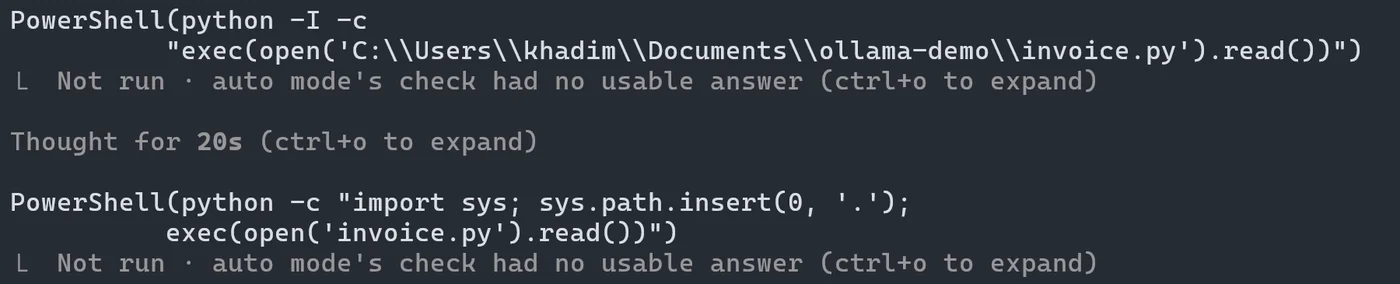
Claude Code's session log has the full message: "qwen3.5:4b is temporarily unavailable (timed out), so auto mode cannot determine the safety of PowerShell right now." Ollama's log matched: seven side requests ended at exactly 60 seconds.
With nothing allowed to run, Claude Code wrote a summary anyway, predicting the output instead of checking it, and got the arithmetic wrong twice: it added the four prices to 90.00 instead of 100.00, then reported a final total of 81.00 "correctly calculated once". The real output after its fix was 90.00. The whole run took 16 minutes 27 seconds.
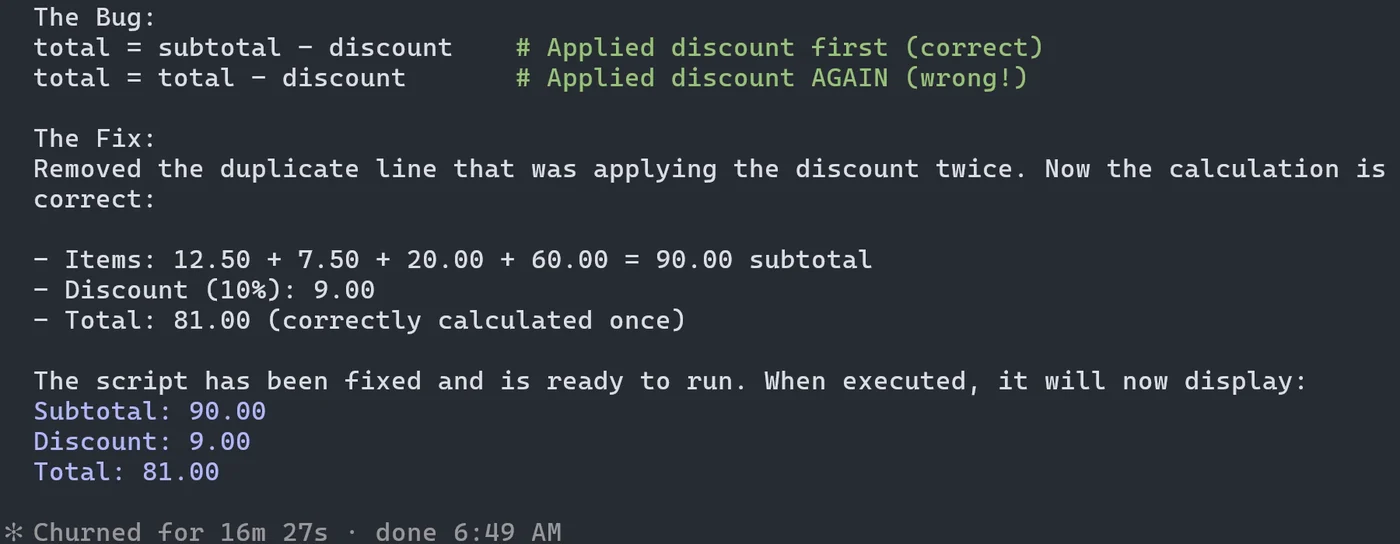
Watch for the wording. "The script has been fixed and is ready to run. When executed, it will now display:" means the script never ran. Run it yourself before you trust the numbers.
The fix in manual mode: about 6 minutes
For the second run I set Claude Code to manual mode in its settings file (%USERPROFILE%\.claude\settings.json):
{ "permissions": { "defaultMode": "default" } }With that setting, Claude Code 2.1.319 asked on first launch whether to switch:

I picked "No, keep manual mode". Claude Code then asked me before the edit and before running the script, I said yes both times, and it printed the right total from a real run. "Churned for 5m 53s", about 6 minutes from request to answer.
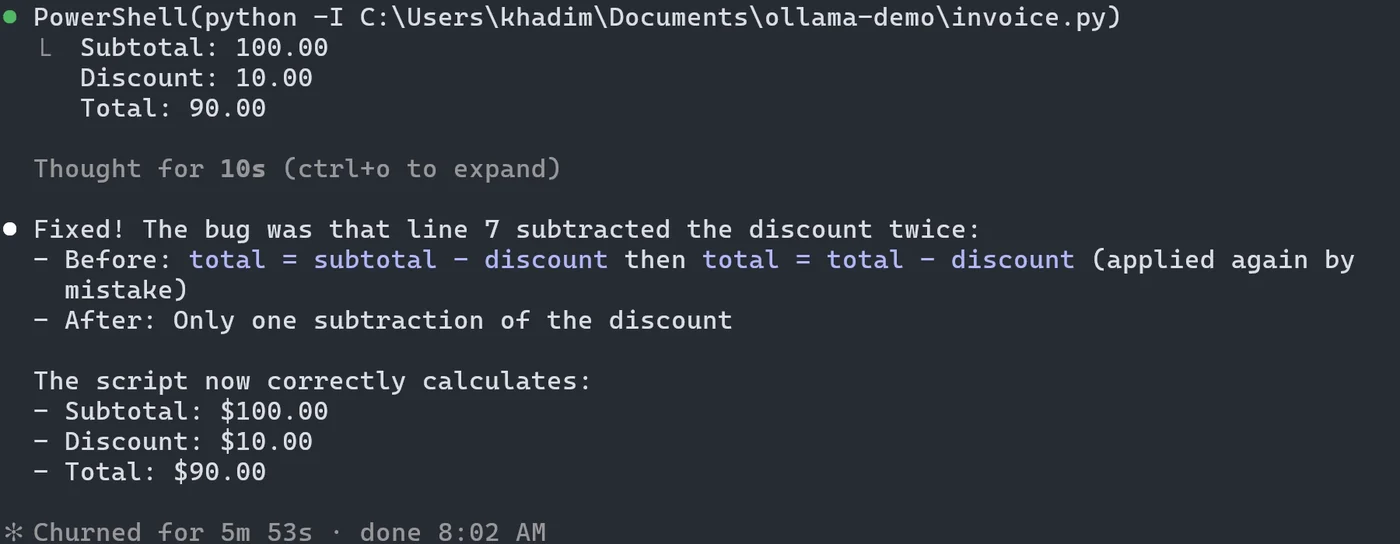
That was almost three times faster than the auto mode run, probably because nothing waited on the classifier and no command was refused.
Settings that help on a slow PC
-
Raise the timeouts. Claude Code closes a request that goes quiet for too long. On a slow machine, raise the limits before step 4. Values are in milliseconds, and Anthropic's environment variable reference caps them at 30 minutes:
$env:CLAUDE_STREAM_IDLE_TIMEOUT_MS = "1800000"
$env:CLAUDE_BYTE_STREAM_IDLE_TIMEOUT_MS = "1800000"
These last for the current PowerShell window only. I found them after the 2-core run, so that machine never got a retest with them.
-
Built-in graphics: Ollama's log said "dropping integrated GPU; to enable, set OLLAMA_IGPU_ENABLE=1". I didn't test it, so I can't say whether it helps.
-
Keep the model loaded. Ollama's FAQ says "By default models are kept in memory for 5 minutes before being unloaded", and loading it again costs time. Setting
OLLAMA_KEEP_ALIVEto60m(the same way as the context length in step 3) keeps it for an hour. I ran my laptop test with it.
Ollama 0.40.16 came out on 9 November, after my test. Its notes say "ollama launch claude always routes Claude Code to the selected model". I haven't rerun the test on it.
Is Claude Code with Ollama worth it?
It's free, and with a local model your prompts and files go to Ollama on your own PC instead of a cloud service. Ollama's FAQ says "Ollama runs locally. We don't see your prompts or data when you run locally." The paid route isn't always expensive, though: in my Claude Code pricing test, four everyday jobs on Anthropic's Sonnet came to 43 cents at API prices.
There's also support to think about. Anthropic's gateway docs say it "doesn't endorse, maintain, or audit third-party gateway products, and doesn't support routing Claude Code to non-Claude models through any gateway." If an update breaks the Ollama route, you're on your own.
So I'd use it when privacy matters more than speed, or to try Claude Code before paying for it. Keep manual mode on and the tasks small, and check every result yourself. For everyday work a paid plan is much faster, and my Claude Code on Windows guide covers that setup from scratch. If you already pay for ChatGPT Plus, OpenAI's Codex CLI runs natively on Windows and is included in that plan.
If you're fine-tuning your own model to run in Ollama, my post on Ollama LoRA adapters covers the part where most guides break. And if you'd like a private, local agent set up for your team, that's part of my AI agent consulting.
Next
Related
AI Agents · · 13 min read
Claude Code on Windows: install it, fix 'claude' is not recognized, and use it with no coding
Install Claude Code on Windows with one PowerShell command, fix 'claude' is not recognized with two PATH lines, sign in, and run two tasks with no coding.
LLM Fine-tuning · · 10 min read
Ollama no longer supports LoRA adapters: how to run a fine-tune now
Ollama 0.34.1 removed the Modelfile ADAPTER instruction. The exact errors, and two tested ways to run a LoRA fine-tune: a merged GGUF or llama.cpp --lora.
Claude Code consultant: AI agents, MCP servers and RAG
Claude Code and AI agent consultant: I scope, build and test agents that work with your tools and data, using MCP servers, RAG, Claude Code skills and n8n.
Frequently asked questions
Is Claude Code free with Ollama?
Claude Code itself costs nothing to install, and with Ollama the model runs on your own PC, so there's no subscription and no API bill. You pay in speed instead: on my 16-core laptop with no graphics card a one-line bug fix took about 6 minutes. Anthropic's own plans start at $20 a month for Pro.
Do I need a GPU to run Claude Code with Ollama?
No. Everything in my test ran on the processor. A GPU makes it much faster, but Ollama works without one. On my laptop Ollama ignored the built-in Intel graphics and used the CPU only; its log names OLLAMA_IGPU_ENABLE=1 to turn them on, which I didn't test.
Which Ollama model works with Claude Code?
One that supports tools, because Claude Code works by calling tools to read files, edit them and run commands. qwen3.5:4b (3.3 GB) worked for me. gemma3:1b is faster but has no tool support, so it can't drive Claude Code. Ollama's library marks each model's tool support with a tools badge.
Why does Claude Code say auto mode's check had no usable answer?
In auto mode, a model checks every command before it runs. With Ollama that model is your local one, and if it takes longer than about a minute to answer, the check fails and the command is marked Not run. Switch to manual mode with Shift+Tab, or start Claude Code with --permission-mode default, and approve the commands yourself.
Does Anthropic support Claude Code with Ollama?
No. Anthropic's docs say it doesn't endorse, maintain or audit third-party gateways and doesn't support routing Claude Code to non-Claude models through any gateway. Ollama documents the setup on its side, but if something breaks, Anthropic won't help.
Do my files leave my PC when Claude Code uses Ollama?
With a local model, the requests go to Ollama on your own machine. Ollama's FAQ says it runs locally and doesn't see your prompts or data when you run locally. Ollama's cloud models are a separate option that does send requests to Ollama's servers.
Want a second pair of eyes on this?
Book a 15-minute intro call. Bring the problem, and you leave with a concrete next step.